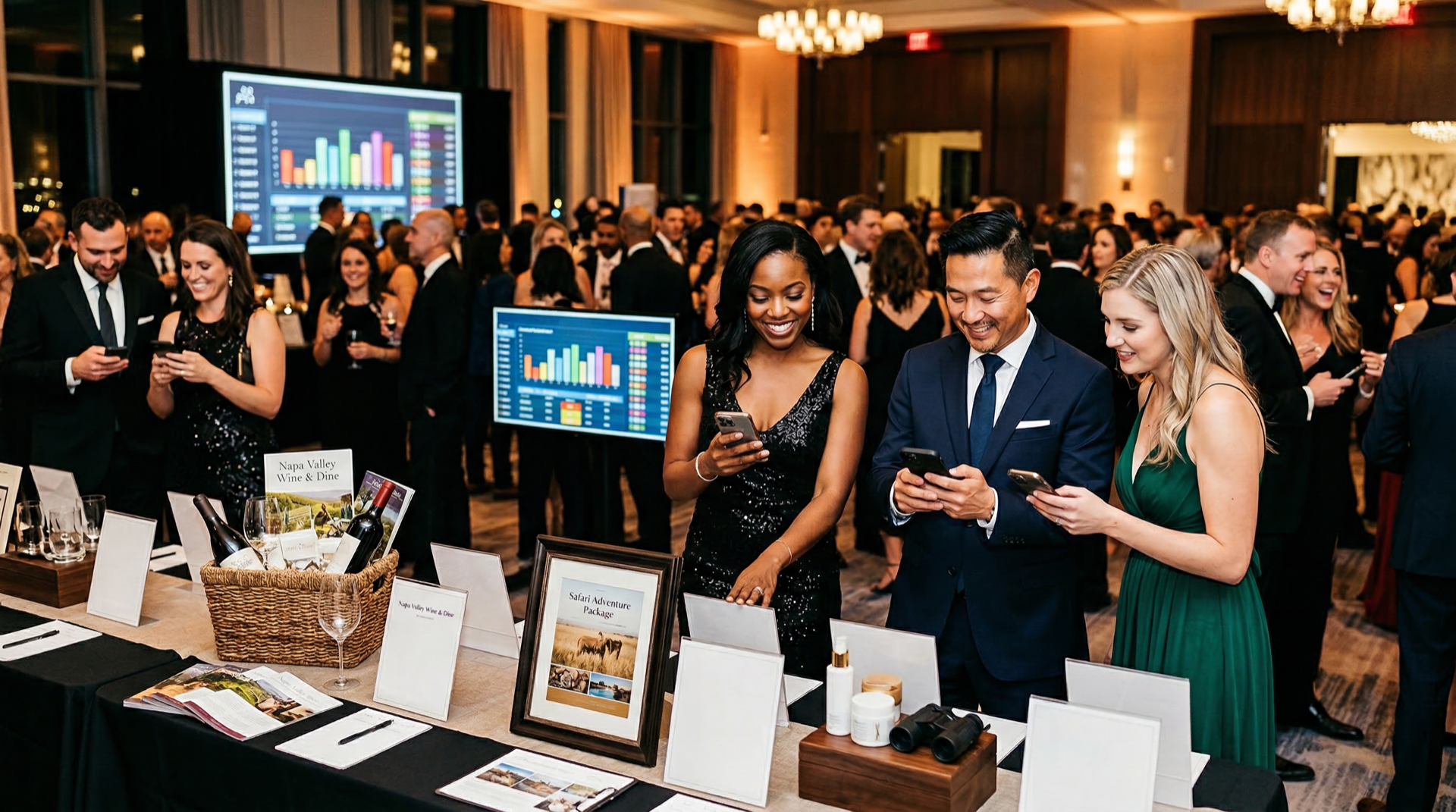


Silent auctions are typically high-investment, high-reward fundraising events, so how you prepare yours matters. The strategies and platforms you use to procure items, plan the event, and engage guests will determine your return on investment. Fortunately, we’ve seen it all when it comes to fundraising events, and we’re here to help.
In this guide, we’ll cover the following auction fundamentals:
- What is a Silent Auction?
- How Does a Silent Auction Work?
- How to Conduct a Silent Auction: 5 Steps
- Choosing Fundraising Silent Auction Software

What is a silent auction?
A silent auction is an event where guests place bids on items, either by writing them on a piece of paper or using the event’s accompanying online auction website. Silent auctions can be standalone or paired with another event, such as a gala, dinner, or golf tournament.
The items, prices, and layout of your fundraiser depend on your event’s theme, location, and guest demographics. Similar to live auctions, the goal of a silent auction is to raise funds through bids on donated items, so make sure you tailor featured items to your unique audience.
How Does a Silent Auction Work?
Whether your auction is in person, fully online, or hybrid, the bidding process typically looks like this:
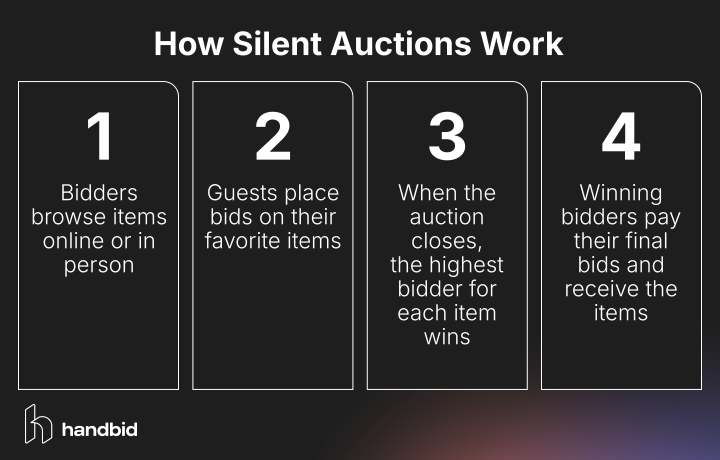
- Bidders browse items online or in person. Unlike live auctions, where items are auctioned off sequentially, silent auctions allow guests to browse items at their leisure before placing bids.
- Guests place bids on their favorite items. When silent auctions first began, guests would write bids on a piece of paper in front of their chosen item. Now, mobile auction software allows guests to place bids on their smartphones and receive notifications when someone else gets ahead, prompting them to raise their bids.
- When the auction closes, the highest bidder for each item wins. Your mobile bidding software should automatically notify the highest bidder that they won, unless someone else paid the “Buy It Now” or buyout price. A buyout price is generally 150-200% of an item’s fair market value (FMV), and when placed, will automatically end bidding on that item before its closing time.
- Winning bidders pay their final bids and receive the items. Create a designated checkout location that won’t interfere with guests leaving the event. For online auctions, guests should be able to redeem their purchases and receive delivery information for physical items immediately after the silent auction’s end.
Details about your organization’s bidding and checkout process will vary depending on your venue, auction platform, and event timeline, so set clear rules and expectations for your event and communicate them to guests. If you’re hosting a hybrid auction, ensure that guests have the same bidding experience online as they do in person.
How to Conduct a Silent Auction: 5 Steps
Now that you know the basics, let’s dive into the core steps of planning and hosting a silent auction fundraiser. Preparation may take longer than you initially assume, so make sure you have enough staff and resources to devote to planning, especially if you intend to run another event alongside your auction. Keep scale in mind for each part of your preparations, since you don’t want to end up with unsold items at the end of the night!
When you’re ready to begin, follow these steps:
1. Set the stage for silent auction success.
Two things will play a large part in your auction’s success from the beginning: your core team and your auction management software. Start the planning process by solidifying each one.
Assemble your auction committee.
A dedicated auction committee should handle all auction-related activities. Your team should consist of:
- An auction chair who serves as the team leader and coordinates between team members, volunteers, and your nonprofit to keep everyone in the loop. Appoint an auction chair with previous experience, as their actions will set the tone for the entire silent auction.
- A procurement team of people responsible for obtaining your auction items. They will reach out to businesses, tap into your nonprofit’s network, and follow other leads to collect items your guests will want to bid on.
- A logistics team to handle all the easy-to-overlook but vitally important details, like finding a venue, registering guests, and ensuring all purchased items go home with the right bidders.
- A marketing team that gets the word out about your auction to attract guests, creates compelling invitations and advertisements, and promotes the event and select auction items.
- Volunteers who help where they are needed, whether that’s with other teams or on the event day itself. Volunteers ensure the event runs smoothly by setting up the venue, checking guests in and out, and gathering auction items for guests at the end of the night.
The number of people on these teams will vary depending on the size of your nonprofit and the event.
Choose an auction platform.
The right auction software will prevent the problems organizations encounter with paper bid sheets, such as illegible handwriting, invalid bids, or missing bid sheets. It’ll ensure a smoother, more engaging experience for guests and help you raise as much fundraising revenue as possible. The best software even simplifies auction preparation for your team.
There are a lot of options out there, so do your research and compare top providers before requesting demos. When assessing auction software, look for the following features:
- A native mobile bidding app: Choose a platform that includes a mobile app for guests to submit bids, input maximum bids, and receive push notifications when they’re outbid. That way, they can stay engaged without having to check websites or emails for updates.
- Cloud accessibility: Cloud accessibility allows for real-time bidding (a necessity for hosting hybrid events) and enables guests to bid both in person and remotely.
- Event management features: In addition to bidding features, look for managerial tools to track ticketing, registration, reporting, and check-out. Using one system to track every element of your auction will let you monitor everything from start to finish, creating more efficiency for you and your team.
- Livestream and leaderboard capabilities: It can be difficult to engage your remote audience when their auction is confined to their phones. Livestreaming lets you deliver real-time updates to guests while interacting with chat messages, further building a connection between you and your donors.
- Auction reporting: The right auction software lets you review your event's results in a comprehensive report to better plan your next silent auction. Make sure you can pull detailed reports showing top bidders, item performance, and overall revenue.
- Security: Find auction software that prioritizes security. Your guests need to feel comfortable sharing their financial information in your silent auction software’s app, and a security breach will erode your supporters’ trust in your nonprofit. Look for PCI-compliant tools, and ask providers about user password protection, incident response plans, and credit card information storage.
- Personalized service: Don’t settle for a chatbot to answer your questions. Every event is different, and you want to work with a software company that offers fast, real-time, expert support on the night of your event.
Handbid includes all of these features and more, offering a streamlined platform designed by fundraisers, for fundraisers. Our platform is trusted by hundreds of organizations, thanks to our extensive industry knowledge and proven track record of raising over a billion dollars for nonprofits like yours.

2. Gather your auction items.
Next, turn your attention to the auction items you’ll offer at the fundraiser. While you can auction off practically anything that your guests want to bid on, we’ve found that a few core categories of items work best:
- Experiences: In general, items that can’t be purchased in a store, like experiences, tend to attract more attention. For example, if you have a room full of wine enthusiasts, why not put together a trip to wine country, complete with an opportunity to create their own custom wine blend? Or, if a large portion of your guests are into sports, call up your local hockey rink and get a ride on the Zamboni donated as a unique experience.
- Bundles or baskets of low-value items: Some sponsors may give small items to your nonprofit that are more trouble than they’re worth to auction off individually. Use these items to create themed gift baskets, which have a higher combined value to potential bidders. For instance, soaps, chocolate, and wine could be bundled into a “treat yourself” gift basket.
In addition, you can’t go wrong with other classics like gift cards, wine bottles, signed memorabilia, and technology.
You should be able to get most, if not all, of these items donated by local businesses and other connections to your organization. Here’s a quick look at how to do so:
Procure items from event sponsors.
Your procurement team should begin its process with a strategy months in advance of your event. Before conducting outreach, clearly define your silent auction’s audience, theme (if any), and fundraising goals. Then, follow these steps:
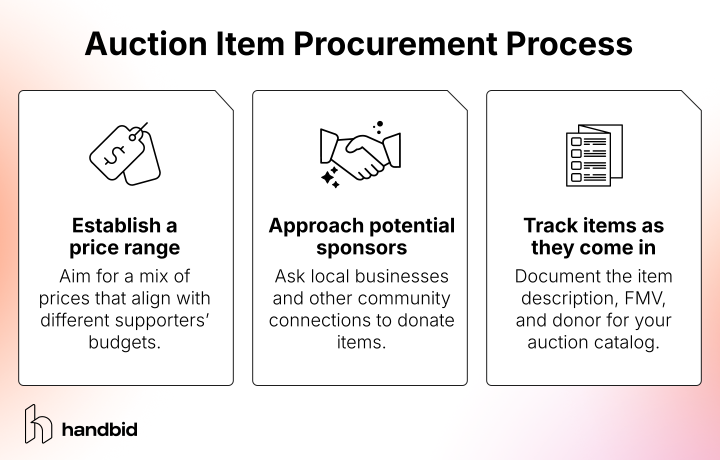
- Establish a price range and item wish list. Your auction items should align with guests’ budgets, but this doesn’t mean keeping all prices the same. A range of prices will engage bidders at all levels and can help build relationships rather than just sell high-value items. If you have any specific items that you know will sell well based on past auction data, create a wish list, too.
- Approach and engage with sponsors. Ask local businesses and other community connections to donate items. Start with your board of directors and existing corporate partnerships. You’ll have better luck with sponsors whose goals align with your nonprofit’s interests and who have supported similar events in the past. The procurement process is an opportunity to build relationships, so invite sponsors to the silent auction and follow up with them afterward to fully express your gratitude. No matter what, thank everyone you talk to at this stage.
- Track items as they come in. When your team receives an item, document it immediately. Include a description of the item, its fair market value, and who donated the item. This will enable you to create a catalog of all items with less hassle and ensure all items are accounted for and properly attributed.
Remember, guests want to bid on items that match their interests and fit into their price range. For example, if your guests are mostly retirees who love wine, you don’t want to fill your auction with items like tickets to the children’s museum.
If you’re not sure which types of items your guests would enjoy, try sending out a survey. Have your guests vote on the auction items they are most interested in. Alternatively, make the survey open-ended and have guests submit their item ideas. That way, you can get guests involved in the planning process and feature items they would actually be interested in bidding on.
Price your silent auction items.
Once you have all your items donated, put them together and decide on their starting bids. This part can get a little tricky, and you’ll need to consider the context of your items, but we have some tried-and-true advice on setting starting bids and bid increments.
First, you will need to determine each item’s fair market value (FMV). After you receive an item, research its value instead of just taking your sponsor at their word. While some sponsors will be honest, others may inflate prices due to prestige or sentimental value.
As a general rule, the starting bid for your items should be 30-40% of an item’s fair market value. However, remember that your goal is to engage bidders and create bidding wars to generate higher revenue for your organization. To achieve this, your incremental bids should be as low as possible to encourage guests to continue bidding.
We recommend the following formula as a starting point for your auction items:
- 40% of the item’s FMV is your starting bid.
- 10% of the starting bid is your minimum bid increment.
Your nonprofit can also choose to offer a buyout price for some items, but be strategic. A buyout price can cause low- or medium-value items to sell for more than they would at auction, while also creating a sense of urgency for other guests who see items that have already sold. However, items that are likely to generate excitement, such as unique experiences, might be harmed by buyout prices if the auction ends before the item picks up momentum.
3. Promote your fundraising silent auction.
With your silent auction software, create a branded event registration page to sell tickets and build your guest list as you start marketing.
This will help you consolidate all guest information in one place, making check-in on the night of your event easier. Having a registration page also allows table sponsors and other guests planning to bring multiple people to your event to edit their own guest lists, freeing up your staff from having to track down guest info before the event.
To get people to your event registration page, you'll need to market the event strategically. Here are some helpful tactics to promote your silent auction:
- Post to social media. Social media is a powerful tool, not only to promote that you’re having an event, but also to explain why you’re having it. Tell the story behind why you started the event, why guests will love it, and who or what they’ll be supporting. Once they are bought into your cause, you can show them elements of the event to look forward to, including any entertainment, keynote speakers, and high-value items.
- Send promotional emails. Message supporters directly using email. Send pointed, specific, and regular communications to your guests and supporters as your auction approaches, advertising your event and your items.
- Launch crowdfunding or peer-to-peer campaigns leading up to the event. There is no better way to promote something than word of mouth. Consider launching a peer-to-peer or crowdfunding campaign leading up to your event, and ask volunteers and donors to seek support from their own networks. This gets the word out not only about your event but about your cause in general.
- Send direct mail with a QR code leading to the registration page. “Snail Mail” is NOT dead! There are still plenty of effective ways to promote your event through people’s mailboxes. Have volunteers address envelopes by hand, include a QR code to your event registration page on invitation cards, or send colorful and unique postcards with details about your event.
- Take advantage of the Google Ad Grant. If your nonprofit is eligible, you could receive $10,000 in monthly ad credits by applying for the Google Ad Grant. The Google Ad Grant is an invaluable marketing tool that allows nonprofits to create Google Ads and promote their websites for free. Once Google accepts you into the program, you can create ads that encourage people to attend your auction. Include the link to your event registration page so people can easily sign up. The best part about the Google Ad Grant is that as long as you follow all program rules, you’ll automatically receive the ad credits each month, enabling you to promote future events and initiatives.
Whichever promotional channels you use, consider your audience once again. What is the best way to communicate with them? There are a few different answers to this question. Diversify your promotion strategy according to your audience, and promote in multiple ways, through multiple avenues.
4. Keep up the energy with mobile bidding.
Once event day arrives, do everything you can to inspire more bids and ultimately more revenue. Beyond having your team of event staff maintain energy in the room, your greatest tool for driving bids will be your mobile bidding app.
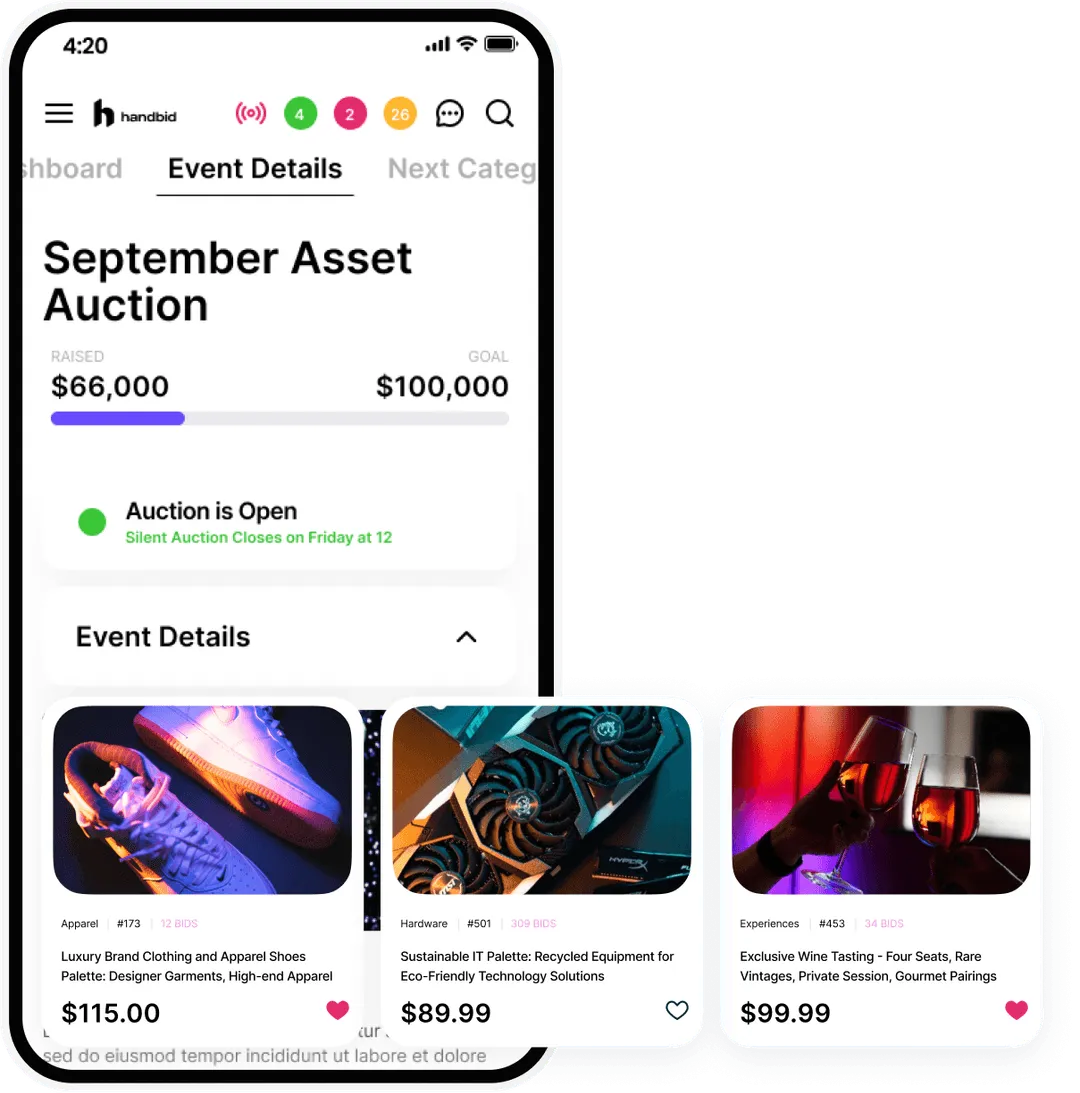
To leverage your app to its fullest potential, make sure that you:
- Present your auction items well. Include compelling, accurate item descriptions and multiple photos of each item so guests can get the full experience of viewing auction items in the app.
- Use outbid notifications. Most mobile bidding apps do this automatically, but make sure yours is set up to notify bidders in the app and with push notifications whenever they’re outbid. This helps guests keep track of their items and encourages higher bids.
- Periodically message bidders. This is especially important if anyone is bidding from home. Use your app to send announcements about the auction’s fundraising progress, time remaining, and other important information. Make online guests feel like they’re in the room with you.
- Highlight underselling items. Some apps allow you to pin items to the top of your auction catalog or highlight different items throughout the auction. Use this functionality to get more eyes on auction items that don’t have many bids, motivating more action.
All of these strategies will help you engage guests and keep the auction alive, even if supporters are participating from different locations.
5. Make auction item checkout easy.
After your silent auction closes, in-person guests will leave en masse. If checking out and paying for auction items takes too long, it can cause frustration and end a fun event on a sour note.
That’s another reason why mobile bidding software is your auction’s best friend! Guests can register their payment information ahead of time and quickly handle payments in the app. Then, all you need is a few volunteers to gather and distribute the items. Even if guests want to pay by check or cash at the end of the night (most don’t), the checkout lines will be much shorter because many others will pay via the credit card on file.
Once guests check out, don’t forget to show your appreciation promptly, helping you build your organization’s network and retain donors long-term.
To make your gratitude especially meaningful, plan recognition efforts early. These might include:
- Gifts: Share a memorable item that will remind donors of their participation in your auction. For example, send attendees a gift card to one of the sponsors’ establishments. Include your nonprofit’s branding in whatever gift you choose to keep your mission top of mind, even after the auction is over.
- Personalized thank-you cards: Whether you handwrite a thank-you letter or send an eCard digitally, let every guest know how much you appreciate their attendance. Call out something specific to let them know the letter was written for them, such as the item they won or a bidding war they started. Even if they didn’t purchase anything, they might be inclined to come back next year.
- Impact reports: Auctions are such high-energy fundraisers that some attendees won’t even realize they’re donating to your cause. Remind them of the auction’s purpose and the impact of their donations by sharing an event recap immediately after the fundraiser. Include information about the event’s success, such as the number of participants and the amount of money raised. Then, explain where those funds will go and keep attendees updated as their donations are put to work.
Remember to thank your sponsors, too! Send thank-you cards that include pictures of the event, and show them how their support made an impact. If their item was a big hit, let them know.
Getting Started with Fundraising Silent Auction Software
As we’ve mentioned, your silent auction software can make a major difference in the event’s success. That’s why we recommend Handbid, our trusted auction and mobile bidding platform built by fundraisers, for fundraisers.
With Handbid, you get everything you need from nonprofit auction software, including:
- A native mobile bidding app that’s easy for anyone to use
- Unparalleled customization to ensure your online auction matches your brand
- Outbid notifications and other engaging gamification features
- Registration, ticketing, and guest management
- Automatic checkout and in-app payments for winning bidders
- Livestreaming and other hybrid event features
- Secure, PCI-compliant payment processing
- Live auction updates and real-time auction reporting
- Additional fundraising tools like Text2Give and paddle raises
Handbid offers all of this and more! From the initial planning stages to execution and follow-up, our powerful tools were built specifically to help nonprofits create standout events, make your job easier, and raise a ton of money for your organization. Contact our team today to get started!
Wrapping Up
A well-run silent auction takes a dedicated team and months of planning to execute, but the right tools can ease the process and ensure the event runs smoothly. To learn more about what your nonprofit can do to prepare for its silent auction, check out these resources:
- 15 Top Silent Auction Platforms & Apps for Nonprofits. Ready to take the next step and start shopping for silent auction software? Read this guide to learn tips for making the most of your auction software and find a provider that fits your needs.
- 9 Essential Silent Auction Rules + Free Printable Template. It’s important to lay the groundwork and set some rules and guidelines for your bidders before your auction begins. Read here for the template!
- Charity Auction Sites: 8+ Best Software Providers Reviewed. A successful online charity auction requires an auction site. Explore your options with our comprehensive reviews of the top charity auction site providers.